Scheduling Power Automate Desktop on the free version
Power Automate Desktop costs nothing extra on Windows, so it is widely used to automate everyday work. Sooner or later someone asks for a flow to run by itself every morning at 8.
This column checks against Microsoft’s documentation whether the free version can run a flow at a set time, and compares the conditions and costs of the ways to do it.
Key points
- With the free version, used with a Microsoft account, a person runs flows from the Power Automate window
- Starting a flow from a run URL, such as from Task Scheduler, requires Power Automate Premium (about ¥2,248 per user per month in Japan, billed annually, excluding tax) or a pay-as-you-go environment, per Microsoft’s documentation
- You can keep the flows you run by hand in Power Automate and move only the work that must run at a set time to another tool. With Kitewell, schedules are free when one person uses it on their own PC
What Microsoft’s documentation says
Microsoft’s page “Run desktop flows via URL or desktop shortcuts” describes starting a flow from Task Scheduler. Its prerequisites are (as of October 2026):
- Power Automate for desktop is installed on the machine
- The user is signed in
- The user has a Power Automate Premium plan or access to a pay-as-you-go environment
The same page also notes:
- By default, Power Automate asks for confirmation when a flow is started from a URL or shortcut. Turning that off risks running a malicious flow someone shared without noticing
- In local attended mode, only one flow can run at a time
Microsoft’s page on getting started with a Microsoft account says desktop flows built that way are saved to your OneDrive and run from the Power Automate console.
Ways to run a flow at a set time
| Way | License needed (as of October 2026) | Notes |
|---|---|---|
| A person runs it from the Power Automate window each time | Free (Microsoft account) | Someone must be there at that time |
| Task Scheduler starts it with a run URL | Premium (about ¥2,248 per user per month, annual) or a pay-as-you-go environment | Power Automate must be signed in on the PC; a confirmation dialog appears by default |
| Run it with no one present (unattended) | A work or school account and Process (about ¥22,488 per bot per month, annual) | Each bot runs one unattended flow at a time |
| Move only the work that must run at a set time to another tool | Depends on the tool. For Kitewell, see the plans on its product site | Power Automate flows can’t be moved as they are, so they are rebuilt |
Prices exclude tax and are from Microsoft’s Japanese pricing page.
An example of another tool: Kitewell
Descarty’s Kitewell includes schedules even when one person uses it for their own work on their own PC; its plans are on the product site. For a company’s work, you can verify it with us as an early access partner.
It cannot import Power Automate flows, so the workflow is rebuilt. To build it, you tell the assistant what you want in your own words, and AI puts the workflow together. Steps on websites are written in words such as “type into the login ID field”, and when a screen changes, AI reads it again and carries on.
A recorded scheduled run
On October 19, 2026, we checked it with a workflow that collects orders from two stand-in ordering sites and merges them into one list (the two sites without a one-time code from collecting orders from each customer’s Web-EDI). For the recording, we first scheduled it a minute ahead, confirmed that the schedule started a run, and then set it to 8:00 on weekdays.
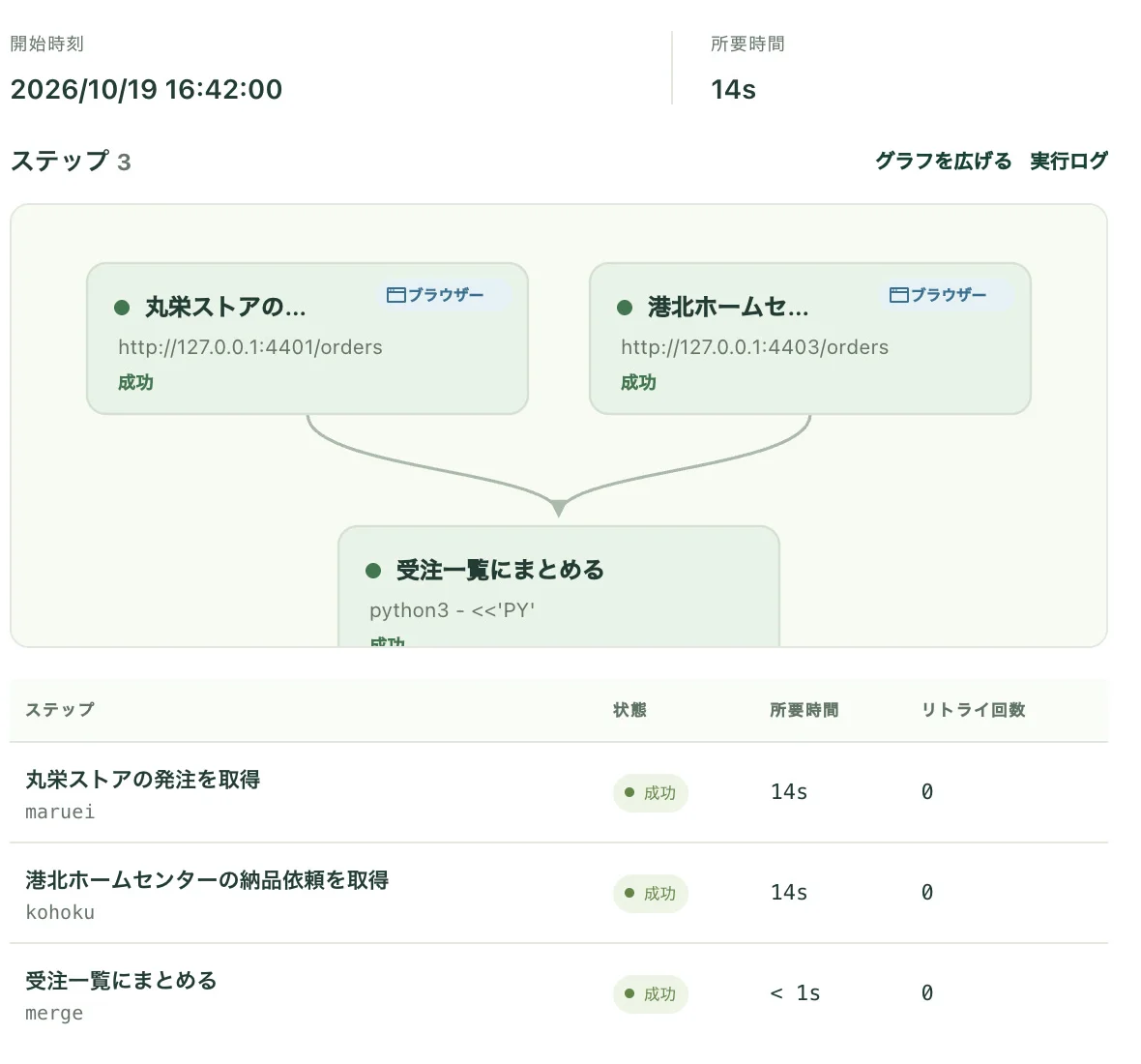
The run started at the scheduled 16:42:00 and finished in 14 seconds.
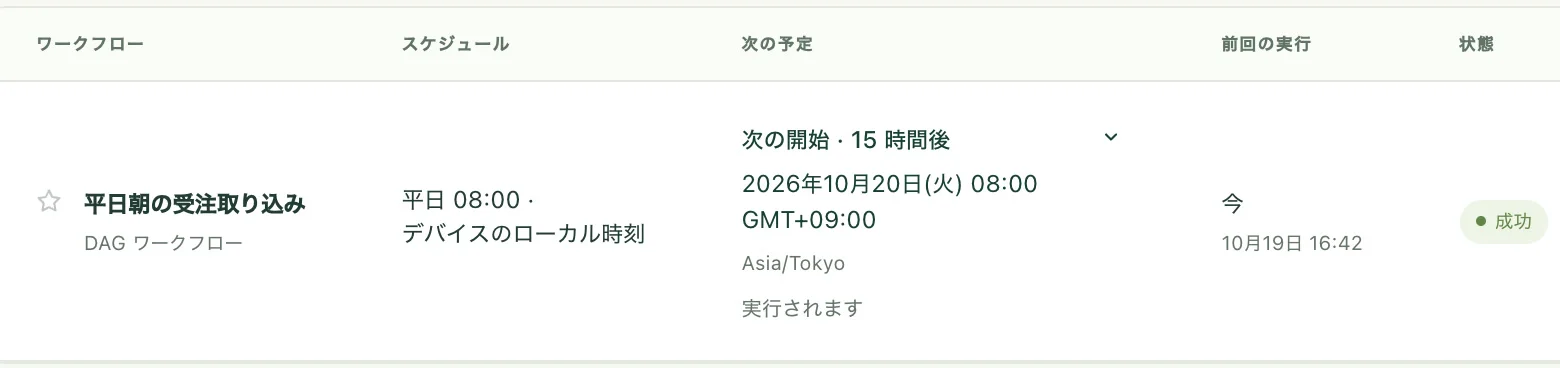
This recording is from a Mac. On a Mac, schedules run while the computer is on and Kitewell is open, and runs missed while it slept or was closed run when it is back. On Windows, workflows without steps that operate desktop apps run even when no one is signed in; steps that operate desktop apps need the screen unlocked with the user signed in.
Kitewell is a download from kitewell.app for macOS and Windows.
When this does not fit
- Your company already has Microsoft 365 and Power Automate Premium: scheduling cloud flows keeps everything in one place
- You have many elaborate Power Automate flows and no time to rebuild them: rebuilding can cost more than the license
- You want to turn off the confirmation dialog and start flows from Task Scheduler: Microsoft warns that this setting is risky. We don’t recommend it
Summary
- With the free version of Power Automate Desktop, a person runs flows from the window
- Starting flows from Task Scheduler or a run URL requires Premium or a pay-as-you-go environment
- You can keep hand-run flows in Power Automate and move only the work that must run at a set time
- For one person’s own work, Kitewell runs schedules too; the flows are rebuilt
For the full picture of what is free and what needs a paid license, see Power Automate Desktop to AI RPA.
Sources
- Microsoft: Run desktop flows via URL or desktop shortcuts (February 25, 2026)
- Microsoft: Getting started with a Microsoft account
- Microsoft: Power Automate pricing (Japan)
- Kitewell: Pricing
For your own work, start today
Download Kitewell from the product site and start on one computer right away. Schedules are included, and no Kitewell account is needed.
For your company's work, we are looking for early access partners. See the program details
- macOSBeta
- WindowsBeta
- LinuxComing