Build, run, and fixbusiness automation,all by conversation.

Kitewell handles workflows from creation to operation in one place: steps written in everyday language, web operations handled by AI, and decisions approved by people. It runs on Dagu, an open-source workflow engine.

Platforms
  • macOSBeta
  • WindowsComing
  • LinuxComing
The workflow editor, with web steps written in plain language such as entering the login ID
Actual screen: web steps written in plain language

Builders and fixers both work by conversation

Instead of recording clicks on a screen, you write the steps in the language of the work. When something stops, you find the cause and fix it in the same place.

AI assistant

Build by conversation, fix by conversation

Tell the assistant on the right of the screen what you want, in your own words. It proposes a new workflow or a change, and shows it as a diff with a preview of the flow. Nothing is saved until you choose Apply.

  • Answers with the open workflow, step, and run in mind
  • Discuss a failed run straight from its screen
  • Proposes changes to batch sheets too, and applied changes can be undone
  • Asks you to store a credential without ever seeing its value
  • Cannot delete workflows or change other settings
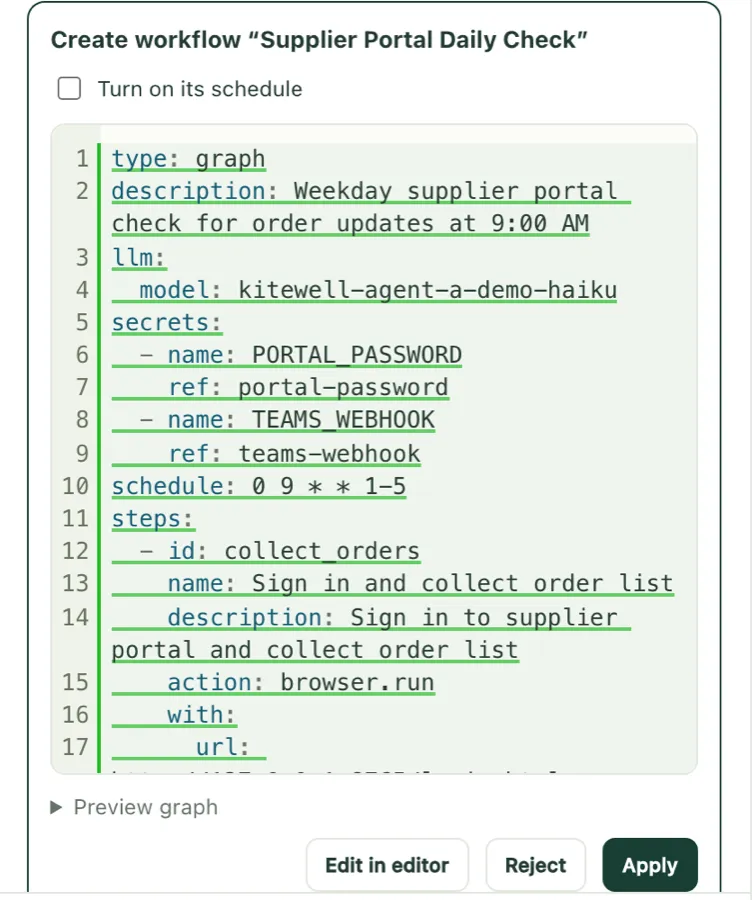
A workflow the assistant proposed, with Edit in editor, Reject, and Apply buttons
Actual screen: nothing the assistant proposes is saved until you choose Apply

Web automation

Describe screen work in plain steps

List steps in everyday language, such as open a page, enter a value, collect information, or make sure of something, and AI operates Chrome. Because it does not depend on screen coordinates or element names, the automation holds up when screens change.

  • Pauses and notifies you when a person must enter something, such as a one-time code
  • Passwords are referenced by name, so the AI never sees the value
  • Saves sign-ins and reuses them on later runs
  • Restricts which sites the browser may load
  • A screenshot on failure shows why it stopped

Kitewell does not solve CAPTCHAs. Each operation sends the page's visible content to the provider of the AI model you choose.

Resume where it stopped

When it stops, continue from where it stopped

From a failed run, Fix in editor opens the failed step with the run's own inputs. Fix it and choose Save and continue: only the failed step and the ones after it run again, and completed steps keep their results.

  • Test any step on its own, unsaved changes included, under real conditions
  • See the failed step and its output straight from the run list
  • Automatic retries, retry from the failed step, or a new run with the original definition
A Kitewell run: recording to the sales system failed, with an Ask the assistant button
Actual screen: the step that stopped, and a button to ask the assistant about it

Decide what AI does and what people check

AI extraction and judgments keep their evidence and confidence, and the run waits for a person wherever a decision is needed.

Approvals and human tasks

People approve the decisions

Add an approval to any step. The approver reviews it, chooses Approve, Send back, or Reject, and enters any values needed. Who decided what, and when, is recorded.

  • Human-task steps with input forms
  • Send back re-runs from a chosen step, then waits for approval again
  • Waiting approvals notify Mac, email, Slack, Microsoft Teams, and more
A Kitewell run: a workflow that collected orders from a supplier portal is waiting for the owner's approval
Actual screen: a workflow waiting for approval

Batch sheets

Process a spreadsheet list as is

Paste rows from a spreadsheet or import a CSV, and each row runs the workflow once. AI reads the values you need from each run into columns, and you can check the quote each value came from.

  • Up to 500 rows per sheet; run only new, failed, or changed rows
  • AI judgments show their confidence, and rows below your threshold go to a person
  • Add a column and fill it without running the workflow again
  • Export inputs, values, and statuses as CSV
A batch sheet listing rent, fees, and status for eight properties, with the quote behind one rent value
Actual screen: values AI read, with the quote behind each

AI extraction and judgment

Reading, judging, and writing as steps

Ask a model a question, judge material against several criteria, or draft text, all as workflow steps. You choose the model, and API keys are stored encrypted in your environment.

  • Major AI model APIs, plus in-house or local model servers that speak the OpenAI API
  • Run AI agents such as Claude Code or Codex as steps
  • Prompts sent to models are recorded in run history

Built to keep running

Schedules, alerts, history, and connections to your systems: the features that stop automation from turning into robots nobody manages.

Schedules

At the right time, in the right order

Run daily, on weekdays, weekly, or on any interval. Set the time zone and what happens to runs missed while the machine was off.

  • Queues control how many runs happen at once
  • See upcoming runs in a forecast
  • Scheduled runs need the machine running Kitewell to be on

Alerts

The right news to the right people

Get alerts for failures, repeated failures and recovery, waiting approvals, missed schedules, and runs that take far longer than usual. Route alerts per project or workflow.

  • Mac, email, Slack, Microsoft Teams, PagerDuty, and signed webhooks
  • Delivery history and channel health

Run and change history

Every run and every change, recorded

Each run keeps step-by-step logs, output files, and screenshots. Workflow changes are kept as versions you can compare and restore.

  • Filter run history by workflow, period, and result, and export it as CSV
  • Approval decisions and send-backs are recorded with each run
  • Restore deleted workflows from their history

APIs and servers

Connect the systems you already have

Combine web operations with APIs, servers, and scripts in the same workflow.

  • Import an OpenAPI specification and configure API calls in a form
  • HTTP requests, SSH to servers, file transfer, and Docker containers
  • Call other workflows, branch on conditions, and repeat over lists
  • Operate Kitewell from AI agents and other systems through MCP and a REST API

Try it on your own work

We propose a PoC that tests one to three of your tasks with real business data.